
Ucupaint 2.4.0
Released Nov 10, 2025 · 1.1y ago
New Features
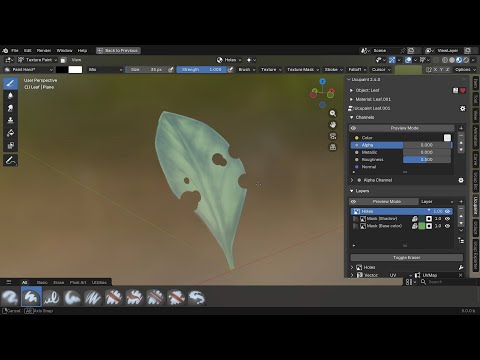
- Dedicated alpha channel (Demo)
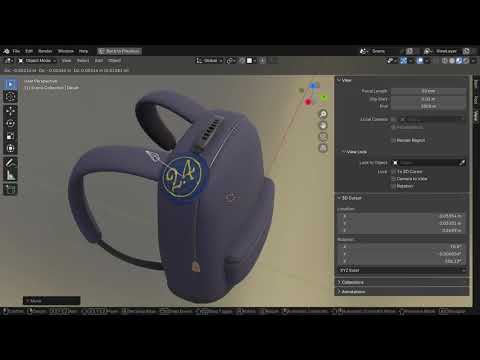
- Decal constraint option to make decal objects stick to the surface (Demo)
- Open layer from Ucupaint material asset (Example)
- "Smoothness" suffix in the file name is now detectable for loading images to a single layer.
- Other object color baking is now available for creating a mask.
- Mirror modifier will be temporarily applied when sculpting VDM images if
Mirror U/Vis enabled. This will make it possible to sculpt at the mirrored mesh. - New operator in the normal channel cog wheel button to apply all VDM layers to multires modifier.
- OSL option is now available for layer/mask baking.
- New option to add Ambient Occlusion channel after Quick Setup.
- New option to use transparency for missing ray in other object normal baking.
- Layer alpha is now selectable as the layer channel source.
UI Updates
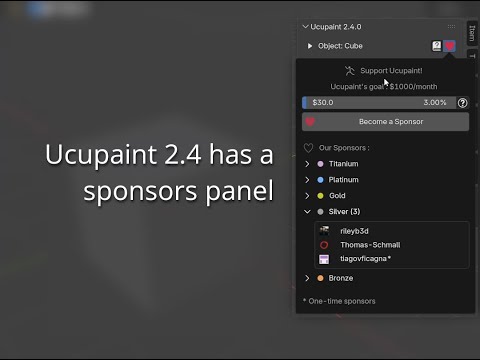
- New sponsors panel to show Ucupaint supporters and the goal (Demo)
- Info panel now shows contributor icons.
- Both sponsors' and contributors' data are updated once per day.
- There will be a button to switch to material view when the user is in solid/wireframe viewport.
- There will be a warning message when creating realtime AO/Edge Detect layer/mask, which mentions that the rendered/baked result can be different
- Active channel name will be visible when the main channels list is collapsed and layer preview mode is enabled.
- Material-specific options like render method/alpha blending are now moved to the new material dropdown.
| Info panel now shows contributor icons | Ucupaint sponsors will be shown in the sponsors panel | New material dropdown for material related settings |
Performance Improvements
- Less lag when doing a transformation operation while Ucupaint UI is open.
- Less lag when changing Ucupaint UI sliders.
- Faster native VDM baking for Blender 5.0
- Faster VDM baking since all unrelated objects are automatically hidden while baking.
Changes
- Background layer and alpha toggle are no longer available to use since the functionality is already covered by a dedicated alpha channel.
- Baking other object data now will hide the source objects after baking (It can be changed in the bake dialog box and there’s a button to unhide the source objects).
- Baking fake lighting will use a 32-bit float image by default for better gradient (Blender 2.80+)
Vertex Coloris now calledColor Attributesin Blender 3.2+ to match Blender convention.Open Available Imagerenamed toOpen Existing Image- Smooth bump will be enabled by default, but only for Blender 2.76 and 2.77, since it’s the only way to make the bump map visible in the viewport.
- Loading material assets is now only available for Blender 4.0+ since it returns an error in earlier versions.
Bugfixes
- Blender built-in icons are now used whenever possible to avoid missing icons.
- Fix: Baking channel with multiple objects can cause some objects to have wrong color when there is missing vertex color data
- Fix: Sculpting VDM image with
Flip Y/Zdisabled produces a wrong mesh - Fix: Baking mask to image returns an error if the active object is hidden in the viewport.
- Fix: Blender 5.0 doesn’t create an output node by default, which is causing an error.
- Fix: Cannot bake layer/mask with blur enabled in Blender 5.0
- Fix: In certain cases,
Refresh Linear Color Spacebutton can appear and cannot be removed - Fix: Toggling the eraser on custom brush with
Erase Alphablending sometimes can cause an error - Fix: User can mistakenly open color ID attribute as a layer/mask.
- Fix: Removing a layer does not remove its baked image masks
- Fix: Baking mask to image with preview mode enabled sometimes can disconnect the preview node.
- Fix: Animation playback causes errors on Blender 5.0
- Fix: Wrong default value when baking custom bake target if there’s no layer using the channel
- Fix: Cannot register addon when updater JSON is empty
- Fix: Bake other object extrusion and ray settings are not available to access when
Use Cageis disabled.
Note
Ucupaint 2.4.0 still supports all Blender versions from Blender 2.76, so no worries for anyone who still uses older hardware/software
Video Demos
 |
|---|
| Dedicated alpha channel demo |
 |
|---|
| Ucupaint sponsors panel demo |
 |
|---|
| Decal constraint demo |